BlogGlue

Greetings!

Here are a few of my favorite things: Nintendo, Penny Arcade, The Legend of Zelda, Mario, Pokemon, Harvest Moon, Fallout, Dungeons and Dragons, books, dice, Professor Layton, Shadow of the Colossus, Minecraft, and so much more. I'm going to talk a lot about video games, I sincerely hope you don't mind.

Newest paper sculpt project!

Sonic Screwdriver trio for my friend's birthday.

An interview with Adam Harum of Transolar Galactica.

They achieved their Kickstarter goal, and now the world gets more of their award winning sci-fi comedy!

Doctor Who themed lip balm!

Brought to you from Earthtastic! and A Bit of Geek.

Minecraft paper sculpt!

My submission to the Mojang community art contest. Watch the video!

A TARDIS desk lamp!

Instructions and babbling on how to make a TARDIS lamp from foam core!

Showing posts with label computers. Show all posts

Wednesday, January 29, 2014

An Open Letter to Internet Explorer

Dear Internet Explorer,


It would be extremely easy for me to start this off with, “Please go **** yourself,” but I’m classier than that. So, allow me to restart.


Dear Internet Explorer,


You make my work life miserable. Had I known that taking a real job meant using you five days of the week, eight hours a day, I might have considered unemployment, or another retail living nightmare.


May I just say how astounded I am at your lock-up frequency? Because I am. Astounded, that is. It seems that every other time I try to open a tab, or scroll within an existing one, I’m treated to a total system freeze, complete with “this program is not responding” warnings, and the maddening, spinning blue wheel.


I also need to ask a very important question: why is it that often times when I try to close a window, instead of it closing, it becomes a tab within another window? This is a very serious situation, and one that I’m certain causes a blood pressure spike in me.


Let’s take a moment to discuss how slow and choppy you are, and how many tabs I have accidentally closed because of these issues. And while we’re at it, let’s talk about the fact that you don’t have a “reopen closed tab” option! What are you, stuck in 2004?


gmail not compatible with Internet Explorer 
This is so awkward.


And why, oh why why why don’t you have a built in spell checker? It’s like you’re some sort of horrifying beta program that never should have seen actual human interaction. What self-respecting, modern day software doesn’t have spell check? I am a professional, and because you somehow became the “industry standard” (please tell me you catch the heavy, sarcastic emphasis there), I have to use you.


Remember how I just said that I’m a professional? Yeah, it is kind of important for me to come across as one, but, as a human, I tend to err, so as hard as I try to type properly, typos are bound to slip through! But, no, you leave me hanging, Internet Explorer, completely editor-less, and open to making embarrassing mistakes such as “morgtage,” “tomorow,” and “waht” when my fingers are flying across the keyboard.


So you see, you’re a pathetic excuse for a web browser, and you honestly should be ashamed of your “features,” and the fact that you’re sharing the spotlight with legitimate programs such as Chrome and Firefox.


Yours in disgust,


MJ


*header image and preview image created from these images.
Monday, December 31, 2012

Fond Memories of DOS Games.

As we collectively say good-bye to the year 2012 I want to take this moment to look back, way back, to around 1992 or so.

It was a simpler time of DOS based machines, black screens, and mouseless navigation. The keyboards were chunkier and clunkier, and the floppy disks were actually floppy. I remember being in Kindergarten and having 'lab time', where all of us tiny children walked down the hallways and into the computer lab. The lights were dim, the room was warm, and the computers hummed lightly with anticipation of game time.

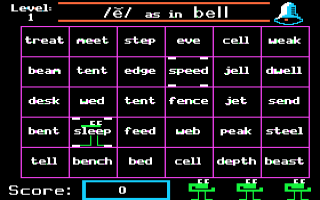
At school the game was always Word Muncher, a simple interactive title where a little green man with a giant mouth and legs walked around a grid and ate words or numbers that correlated to the key word or number. For example!
Aww yiss, Word Muncher. Source.

Those were good times, and I like to believe that is where I started my long and storied life as a computer lover.

When I was in second grade my mom bought our first family computer, and I was floored. I thought it was the best thing in the world, and I was so proud to have a computer at the house. MY house. After school I got to run home and play with it. And you know what I played?

Motha 'effin' Mario Teaches Typing. Source.

Mario Teaches Typing is the party responsible for the typist that I am today. In my prime I could do 77 wpm with virtually no errors. It's a fact that I am perhaps too proud of.

We didn't have internet until I was in fifth or sixth grade, and then it was AOL dial up and a nightmare. All years leading up to that were DOS based gaming bliss. Really just Mario Teaches Typing on Windows 95. My mom still has the box and all install items for it, too. The box is enormous and made of the heftiest cardboard that ever existed. It contains two options depending on your needs: five inch floppies, and three and a half inch floppies. Just hysterical.

What are your best DOS based memories?

-MJ

Friday, December 28, 2012

Down the (apple) Rabbit Hole.

You'll recall that on Wednesday I announced the arrival of my new Macbook Pro and my subsequent desire to load it up with Fallout 3. I mused over the possibility of a dual boot setup, but then my friend suggested I install Wine. So I headed over and followed these instructions (which seemed simple enough, if not lengthy) and I felt positive that I was on my way to a legitimate path of playing a Steam purchased copy of Fallout 3.

Spoiler alert: this story doesn't have a happy ending.

Close to the end of the day on Christmas I set about to downloading my game. I hopped onto Steam and moved forward with the purchase, deciding I'd download it just to be "on the ball" and then I'd install Wine later. It turns out you can't do that! Steam for OSX doesn't like it when you try to download a PC title. With a shrug and a sigh it became apparent that I'd better start with Wine right away.
The first of many status updates announcing my gung-ho intentions.

Commence an hour or four of installing XCode, X11, a Java Development Package, MacPorts, a quick tutorial on using the Terminal, and then Wine, and I was starting to feel pretty optimistic. With the exception of a few minor user error issues everything was going quite smoothly. Wine functioned as it should have and I was able to nab the Windows version of Steam and get my copy of Fallout 3 into an "imaginary" Program Files folder. Well, not imaginary, but whatever on Earth it is that Wine does to interpolate Windows files as readable for a Mac.

I was feeling really good, you know? Savvy and smart. I was entering command lines into the Terminal and making windows open and what-not. On top of the computer world, I was! 

On top of the world, but still just a touch confused.

Things began to fall apart when I went to actually install the game. A lot of dialogue boxes popped up and everything went well at first. When it became time to install the .NET component, though, I thought my computer might blow up in angry protest. It threw multiple (and repeated) violent errors warning missing components and crashing files and error reports before finally exiting out in a huff of smoke and leaving me staring surprised at the innocuous open Steam window.

After a few looks around online for solutions I found the missing DLL components that it so desperately needed (according to the Terminal log, anyway), but I was met with disappointing results. At this point I had sort of coded myself into a corner and I really no longer knew what was installed and what I was missing. So...


First off, please forgive that typo. I was extremely tired and apparently sort of incoherent. I had stayed up until around 1:30 trying in vain to produce satisfactory results, but when it became apparent that I'd have to start over I decided to turn in for the night. I then proceeded to lay awake until around 3:00, just, thinking about the errors and of possible solutions. I woke up at 7:00 sharp and found that I was absolutely wired for some reason, and that reason was desperation to get back on my laptop and make the frigging game work.

So on hardly four hours of sleep I set back to work. I found a second tutorial with a different set of instructions, and I worked with a clean slate and crossed fingers that the planets would align and the computer gods would have mercy on my Fallout deprived soul. 


Sadly, today was not my day. After conceding defeat I fell back into bed and slept for three hours.  

Anyone have a copy of Windows 7 they're not going to use?

-MJ

Friday, November 30, 2012

Why Holiday Tech Support Isn't So Bad (To Me)

I keep reading these articles online that talk about preparing for holiday tech support. They caution tech savvy individuals to "brace" themselves for an onslaught of family members asking for help and advice. There are articles that advise bringing install discs and compressed air to Thanksgiving and Christmas dinner. I think of the ever popular "I will not fix your computer" shirt, and I'm not entirely sure how I feel. I think I need different sentiments on my shirts. I'll put them in this post.

My family asks me for computer help whenever I'm home, so I don't expect the holidays to be any different. The exception being that when new gadgets are received on Christmas day we generally sit down and learn the object together. It's not easy to "fix" something when it's brand new to me, so there's that as well.

And sure, I don't always feel like fixing a computer or looking into a printer or troubleshooting a fritzy mp3 player, but I do anyway. My family depends on me, and a lot of people do feel truly lost when something with their technology goes awry. All the same, I'm a believer of firm but nice answers. Perhaps a little, "Can we look at it later?" or, "Why don't we find a time when things aren't so hectic." It's important to set boundaries because we (myself and other tech-smart people out there) are home for the holidays and we all deserve to relax, too.
For the hungry nerds.

Perhaps more important than learning to say "no" is learning when to admit defeat. I'm not an expert by any stretch of the word, but in many cases I seem like it to my family. They expect me to have answers and solutions, and for my own sanity I need to be able to say that the problem is beyond me and they should seek other options. Of course I hate it when this happens! I want to be able to help, and I get a lot of satisfaction from fixing problems. However it doesn't help me to get stressed and end up ignoring family just to fix one wonky machine.
For the nerds who are honest with themselves.

I realize that my situation probably isn't like everyone else's: I don't have huge extended family holidays. If I'm fixing something then it's only one or two little things for my mom, and she's amazing so I don't mind helping her. Earlier this week I spent an entire day getting her desktop machine in shape and installing a fancy new printer. I know how much she appreciate it, and that makes me happy.

For the momma's nerds. (me)

Are you the tech support person in your family? Do you dread holiday gatherings because of it? I want to know!

-MJ

Monday, September 24, 2012

To Apple, With Confusion. Why Are You Update Blocking Me?

In fall of 2008 I acquired my Macbook and it was rather love at first sight. Fast forward (almost) exactly four years later and the love goggles have worn out. This thing is slow, so slow, and has a passion for locking up during minimal web-surfing sessions. I try to keep very little stored on the hard drive (I use an external for most things) and I've done a RAM upgrade before.


And then my computer was lighting fast! ...if only. [source/source]

While a buggy computer is certainly cause for gripe, it's not exactly a rock and a hard place situation. However, with Apple's insistence on releasing an updated OS about once a year, my basic functionality has gone nearly out the window. The majority of programs that I'd like to use require at least 10.6, and sadly my computer is running 10.5.8. In my Windows user mindset I think, "No problem. Just grab a more recent version of the OS and off I go", but Apple has other plans.

I prefer both Mac and Windows. Both have their strengths and weaknesses, and each offer different types of satisfaction and use. For instance I love being able to dig into a Windows machine to fix a problem. With Macs, I love that all hardware works seamlessly together without various company's incompatibility concerns. I absolutely prefer the price point of a Windows machine, and I cannot ignore the visual appeal of Apple products. Apple haters be damned, they are undeniably visionaries.

So shiny. So sleek. [source]

I find myself quite trapped with my Macbook though, given my "ancient" OSX version. I'd love to pop onto the Apple website, purchase Mountain Lion and solve my program compatibility issues. But, no. Apple doesn't want to make it that simple. Mountain Lion is purchasable online only through the Mac App Store. The Mac App Store does not exist in 10.5.8. I need OSX 10.6.6, an update of Snow Leopard, which cannot be purchased from Apple online. That's right, the software necessary to run Mountain Lion is not available on the Apple website.

Now, I find myself asking, nearly yelling with passion, why Apple would prevent me from obtaining an update. This situation isn't exactly user experience at its finest. Additionally, even if I were to get my anxious hands on a disc version of Mountain Lion (OSX 10.8), it would not install on my system. Why, you ask? Because one of the the requirements of 10.8 is that the computer already be running 10.6. It's a vicious circle.

 This picture should have been a circle graph that I made, but I haven't  reinstalled all 
of my programs since wiping my machine a few days ago, so I'm improvising here!

I believe that I should be able to get a few more good years out of this laptop, and I also believe that Apple should facilitate that. I'd love to know why Snow Leopard is no longer obtainable through the great wide internets. I'm willing to pay for the update, for goodness sake! And, as evidenced by multiple requests for help via Google search, so are many others who are so out of the loop* as to still be running 10.5.8.

Dear Internet, what would you suggest? Do I simply need to deal with the "Genius" bar at an Apple store? What if they laugh at my early 2008 body? I don't think I can handle the technological humiliation.

-MJ

*This is a joke directed at Apple, not users of 10.5.8. They must think that we're out of the loop or computer challenged for waiting "so long" to upgrade.

Twitter Facebook Stumbleupon Favorites More